


HP OmniBook Ultra 16 Review Part #1: Overview - It's a Beast


The mid-October 2026 launch of the HP OmniBook Ultra 16 marks a strategic hardware milestone in the company’s high-performance portable computing offerings. Positioned as the premier flagship showcase for Nvidia’s Arm-based RTX Spark platform and Microsoft’s evolving Windows 11 on Arm ecosystem, this 16-inch notebook represents a deliberate shift in portable architecture. By integrating Nvidia’s RTX Spark System-on-Chip (SoC) - combining a 20-core Grace CPU with a 6,144-core Blackwell RTX GPU - the HP OmniBook Ultra 16 further develops the capabilities of enterprise-level, mobile workstations as local AI powerhouses. Using an architecture that eliminates inter-chip latency and bus constraints, while granting both processing cores and graphics hardware ultra-fast access to a unified, shared memory repository is a step change in performance. It also serves as a definitive real-world testbed for whether local, air-gapped AI development and heavy content creation workflows can thrive in an ultra-thin form factor without mandatory reliance on cloud infrastructure.
Design
I have used many laptops from a variety of manufacturers over the last 30 years. At first glance, the HP OmniBook Ultra shouts: “business laptop”. It’s a dark, matt charcoal (“Eclipse Gray” officially) slab with HP’s logo etched discretely into the lid. Made of CNC aluminium, it’s cool to the touch - no creaky plastic on this build. Lifting it out of its box I expected it to be much heavier, given its spec, but it’s lighter than I thought at 4.89lbs (2.2kg). Powerful gaming laptops are often a lot heavier, and while ‘portable’ are not really meant to be lugged around. However, this is a 16-inch laptop, so there is no escaping its size at 14.01 x 10.1 inches, making it more imposing when compared with a 14-inch model. What makes the HP OmniBook Ultra 16 different though is how thin it is. At less than an inch thick, it’s a genuine slip-into-your-backpack machine, clearly designed to be portable.

Opening it up reveals a large haptic glass touchpad and keyboard with big keys. I found the touchpad took a little getting used to because of its sheer size, but the extra space is welcome when not using a mouse. The keyboard itself is also dimensionally bigger. I have large hands and long fingers, meaning that I find the average laptop keyboard a little cramped. The HP OmniBook Ultra’s keys have 1.5mm to 3mm key spacing, and a slightly deeper key curvature - meaning that my fingers are less likely to slip off, and I noticed my accuracy rate when typing had improved.

Other aspects of the machine’s design hint at the hidden power and the inevitable consequence of its workstation capabilities. A rear ‘lip’ extends half an inch beyond the screen hinge for its entire length, containing the thermal exhaust ports, allowing hot air to be expelled straight out of the back, into an area that is usually clear of obstructions. This makes sense from a practical perspective but does limit the screen from operating in e.g. a tablet mode. This would have been a welcome addition given the multi-touch support. Finally, while the HP Omnibook Ultra 16 appears to sit quite flat on the surface of a desk, it has a curved indent running underneath the chassis containing the cooling fans, lifting it just enough to enable airflow. In practice I found this worked well. Yes, when I stress-tested it, things got hot and the fans were working hard, but the temperatures were not alarming, even when sitting on my lap.
Specification
The specification of the machine that was provided for review is the HP OmniBook Ultra at "Max" tier. I’ve included as much detail as possible because this matters when reviewing such a powerful machine, but also this may be many people’s first experience of the RTX Spark platform, and there are different criteria by which to evaluate it.
Processor & Graphics: NVIDIA RTX Spark N1X (6144-core Blackwell GPU, 20-core CPU) running at 4 Ghz, 62GB graphics.
Screen: 16-inch 3K (2880 x 1800) OLED multitouch display.
RAM: 128GB (LPDDR5x-9400 MT/s) / up to 300 GB/s total memory bandwidth.
Storage: 2 TB (1.86 TB available)
Price: $6,000+
The amount of RAM may seem excessive, but the RTX Spark N1X has a trick up its sleeve to take advantage of it. While x86 architectures using a discrete GPU are restricted to a fixed 24GB VRAM pool while system RAM resides across a potentially slower PCIe channel, the Nvidia chip can dynamically route compute workloads across a shared, high-bandwidth RAM pool. Given the 128GB on this review configuration, very large AI models can be executed entirely within its unified high-speed memory space. To manage allocation, the installed Nvidia App provides a dynamic allocation slider with specific maximum VRAM caps tied to physical system RAM tiers - in this case allowing dedicated GPU allocation up to a whopping 96GB!
The multitouch screen is gorgeously sharp, featuring a 16:10 aspect ratio, 120Hz Variable Refresh Rate (VRR), and a 0.2ms response time. It’s also clear and bright, hitting 1,100nits peak HDR (500 nits SDR) while its slim bezels provide a 91% screen-to-body ratio. The result is something that lights up all but the darkest of rooms with vibrant colours and deep blacks. I really didn’t want to touch it but did so to test its responsiveness (which was excellent) before hurriedly cleaning my fingerprints off!
The elephant in the room is the OmniBook Ultra’s price. At over $6,000, this is a very significant investment in anything, especially a laptop. This is nothing to do with HP though: similarly spec’d, Spark N1X-based machines by other vendors have comparable prices. Some of the cost is due to Nvidia's chip set, but more so by the amount of RAM. The global memory price increase affects all manufacturers, and HP provides configurations with 64BG and 32GB, reducing the cost significantly.
Outside the Windows-based market, Apple’s maxed out MacBook Pro M5 Max (128GB RAM, 2TB SSD) is priced even higher, such is the premium cost of high-end machines. Apple’s target market for its range-topper is firmly in the creative professional camp, while gaming laptops with RTX 5 series dedicated GPUs can be had for $3,000-$4,000. While it can be done - and I do this using my M4 Mac Mini - local AI inferencing is a niche use case for Apple and gaming laptop manufacturers.
Connectivity
Given the thinness of the machine, the number and type of physical connections on the HP OmniBook Ultra 16 are reasonable. On the left-hand side is an HDMI 2.1 video output port, two 40Gbps Thunderbolt 4 / USB Type-C ports (supporting USB Power Delivery 3.1, DisplayPort 2.1, and HP Sleep and Charge), and a 3.5mm combo audio/microphone jack. The right-hand side has two 10Gbps USB Type-A ports and a microSD media card reader - but no USB Type-C. This is a disappointing omission given the charging cable is of this type, meaning you can only attach it to one side of the machine. Power is provided by a 140W USB-C GaN wall wart, which while powerful, is also quite heavy. It can feel a little wobbly when plugged in to an outlet vertically (US-style twin prong), so placed it flat using an extension lead.
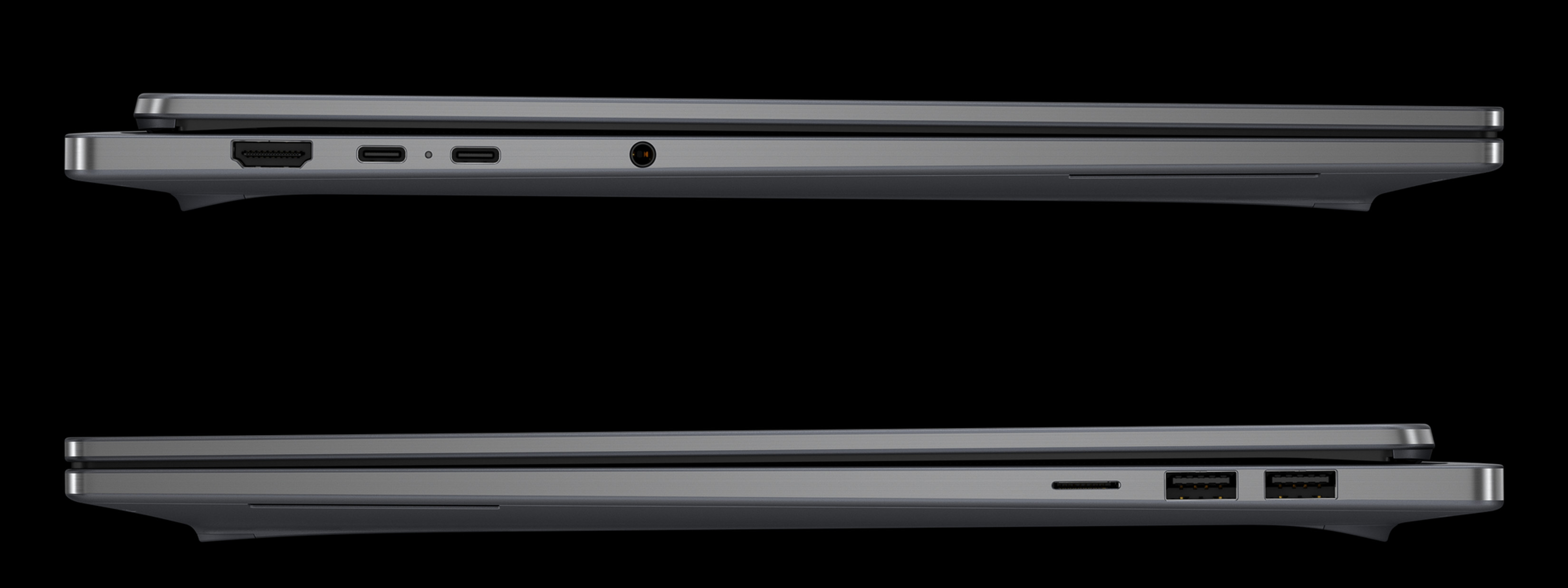
Elsewhere, wireless connectivity is provided via a MediaTek Wi-Fi 7 MT7925 (2x2) and Bluetooth 6.0 module. The built-in 5MP IR webcam offers temporal noise reduction, HDR auto switch, and a dedicated manual physical privacy shutter built-in to the edge of the bezel. A neat feature, but I found it a little fiddly to use. Onboard sound is supplied via quad speakers powered by smart amplifiers, Poly Studio audio tuning, and DTS Virtual:X spatial sound. The audio quality is better than average, but I didn’t find it outstanding.
Getting Started
The OmniBook Ultra with RTX Spark N1X runs Windows 11 on Arm. Like all Windows machines, a fresh install is a laborious process, with multiple updates, restarts, configuration options, questions etc. While you can skip some stages, it is still a royal PITA to get to a point where you can be productive. If you’re new to the RTX Spark platform (like I was), or are keen to get up-and-running more quickly, Nvidia provides an app on the desktop that offers a set of guides to set things up from scratch - creating agents, setting up an AI developer workspace, etc. I found it easy to install everything - apart from some head-scratching over account passwords - and this points to an understanding of the intended target. This was a real time-saver that I have not seen on other platforms at startup. I also appreciated the choice when it comes to AI models - frontier, open source, and/or open weight. As a Perplexity user I was disappointed to see that its Portable Computer application was not installed, only because Perplexity integration has been touted by HP as a key feature for running local-first AI models and multi-step workflows directly on your own hardware. [Check: will this be rolled out to this model?] GitHub Copilot is installed though, given its ownership by Microsoft, but I think this should be an option: my preference (and many others) is for Cursor, Claude or Windsurf.
It’s also worth mentioning that, given that the HP OmniBook Ultra is a laptop, there is none of the hassle of connecting a desktop workstation. An analyst I met recently (let’s call him “J”) related to me how he had to hunt around for a USB mouse and keyboard to get his ‘headless’ RTX Spark N1X box working at startup.
Finally, my big gripe: why is there still so much bloatware installed on a $6,000+ laptop? Even responding “Skip” to all the install requests, Windows adds a bunch of unwanted apps that you need to delete manually. I can see why consumer Windows laptop users might want McAfee, Dropbox etc. but for an AI-oriented powerhouse like this machine? Come on!
Who is the HP OmniBook Ultra 16 for?

Powerful laptops tend to fall into two categories of use case: dedicated AAA gaming or high-end media production. HP says that the OmniBook Ultra is targeted at technology enthusiasts across two primary groups: developers and creators. On the developer side, the company suggests those coding, building and running local AI tools, conducting AI rendering or 3D modeling. Robotics engineers and edge AI developers wanting to run local real-time inference on their PC are cited as examples. On the creator side, HP suggests a broad array of AI content creators looking to streamline their workflow and push their creativity using advanced AI tools. But HP suggests that these two primary groups also include gamers - a reasonable assessment, given the demographics, but I think it would be unfair to review the HP OmniBook Ultra 16 as a gaming laptop. I’ll be delving further into this in Part #3 of the review!
As a cybersecurity & AI industry analyst interpreting primary research data, who produces a weekly podcast and manages a YouTube channel (and who is a lifelong gamer), I tick a lot of the OmniBook Ultra’s target boxes. Reviewing the machine, I wanted to test its on-device capabilities, throwing a bunch of different, real-world, complex tasks at it, determined to test its limits in a non-cloud environment:
I imported as many 4K .wav files in DaVinci Resolve as I have in our video podcast archive, previewing, scrolling, editing and rendering them together across multiple projects. It ate them up and spat them out.
I created a replica of my sandbox, “second brain” AI workspace, asking Claude to set things up in Perplexity with its Portable Computer option using llama and a choice of the three on-device models available: PPLX 27B (recommended by Perplexity and the one I used most), Qwen 27B or Nemotron 3.5 Bolt 74B. I set several survey analysis tasks, using multiple spreadsheets containing tens of thousands of data points.
I spent many hours playing my go-to ‘boomer shooter’ - Doom Eternal - running at maximum, full-screen resolution (2560 x 1440), with all settings on high. Despite my best endeavors, I could not get the frame rate to go below 120fps.
While my tests were based on my own requirements, and I spent a total of only around 14-16 hours (plus setup time) on them, this allowed me a get a good initial grasp of the HP OmniBook Ultra’s capabilities. It handled localized enterprise workloads extremely well, in theory enabling air-gapped processing of LLMs, automated video editing, and complex on-device data processing without relying on external cloud infrastructure or exposing sensitive information over public networks. If regulatory requirements and/or security concerns are important to you, a laptop such as this one should be on your radar. Given the current heightened interest in sovereign cloud, data and AI, a laptop workstation such as this could easily function as a mobile datacenter of sorts if required.
On that point, it’s worth mentioning something that other reviewers have picked up on: performance while on battery power. While working, I noticed that I had unplugged the machine but had not seen a noticeable slow-down in performance - usually a “tell” that your laptop is not connected to the mains. I did not test this extensively, but if it is the case, then the HP OmniBook Ultra makes a great case for disconnected use - in the field, at a remote location, while travelling etc.
The Gist
The HP OmniBook Ultra 16 is a beast of a machine. For “pro-formance” users, it represents the apex of portable power today, easily replacing a desktop-bound workstation. It is compact, thin and light, and more importantly, discrete. Laptops like this are at the top end of the premium price bracket, but for good reason. This is a niche market, but one that could grow as the price to performance ratio of AI inferencing reduces, and component costs return to a level that brings significant savings to manufacturers.
I’ll be further delving into how you can use the OmniBook Ultra’s architecture for one specific use case in Part #2 of the review, while putting it through its paces as a creative and gaming machine in Part #3. Meanwhile, my advice is:
Buy this laptop if…
You need all the processing, inferencing and modeling power you can currently get for AI and heavy content creation using AI tools, with a side of AAA gaming.
You are an HP customer with a preferred Windows-based IT operations policy, including Windows-based apps, custom tools and a corporate platform.
You want the possibility of powerful local AI capabilities without relying on cloud-based resources.
You have a need for maximum performance while unplugged.
Consider alternatives if…
You are an Apple fanboy!
You are primarily interested in general creative work using traditional digital tools.
You just want the best gaming laptop for your money.
You have no need for local AI or disconnected working.
You will happily sacrifice performance for a lower price.
Comments